
web design and development, search engine optimization 508-872-3212
  • Home
  • What We Do
    • Web Design & Development
    • Search Engine Optimization
    • Maintenance/Hosting
    • See a full list of services we offer.
  • Portfolio
  • Web Strategies
  • Contact Us
  • Help Pages
  • Get a Free Quote

How To Change Password For Your Email Account

This tutorial will show you how to change the password for an email hosted with Gordon Multimedia. This will help make your email password something you will remember instead of a default password.

1. Go to apps.rackspace.com
You will see a page like the one below

apps-rackspace-login

2. Put in your email address (usually a first name@the name of the business) and then put in your password.

3. Click the 3 bar icon then settings

Screen Shot 2013-09-09 at 3.39.36 PM

4. Click on Change Password

settings-with-arrow

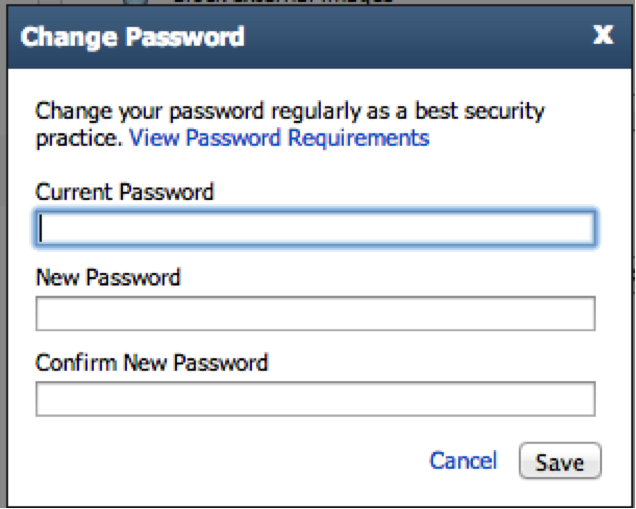
5. Enter in your current password then the New Password and then retype it in Confirm New Password then click save
change-pass

Still have questions? Feel free to contact us with any questions or concerns!
  • Help Page Home
  • Preparing for a Website
  • Flipping the Switch
  • Post Launch
  • Search Engine Optimization
  • Tutorials
    • How to Set an Auto-Reply Message
    • How to Archive your Emails
    • Transferring Emails
    • How To Change Password For Your Email Account
    • Set Up Email For Desktop/Phone
  • WordPress 101
    • Logging In
    • How to Edit a Page
    • How to Edit a Post
    • The Media Library
    • Galleries
    • Custom Post Types
    • Menus

© 2013-2026  Gordon Multimedia LLC.  All rights reserved.
190 Front Street, Suite 202, Ashland, MA 01721
508-872-3212
Terms of Service and Privacy Policy